How to Use Samsung Washing Machine: Quick Guide
Is your Samsung washing machine sitting in the laundry room, but you are still unsure which cycle to pick or where to put detergent? You are not alone. With smart features, steam sanitizing, and eco-friendly modes, Samsung washers offer powerful cleaning, but only if you use them correctly. This guide cuts through the confusion and shows you exactly how to use a Samsung washing machine, step by step.
Whether you own a front-load, top-load, or FlexWash model, you will learn how to load laundry, select cycles, add detergent, use SmartThings, and maintain your machine for peak performance. No guesswork. Just clear, actionable steps to make laundry day faster, quieter, and more efficient.
Power On and Start a Wash
Press Power to Activate
Begin by pressing the Power button on your Samsung washer. The display lights up, showing the default wash cycle, usually Cotton or Daily Wash. Front-load models may display options on a digital screen, while top-load models use illuminated buttons or a knob. Wait a few seconds for the system to initialize before making selections.
Load Laundry Properly
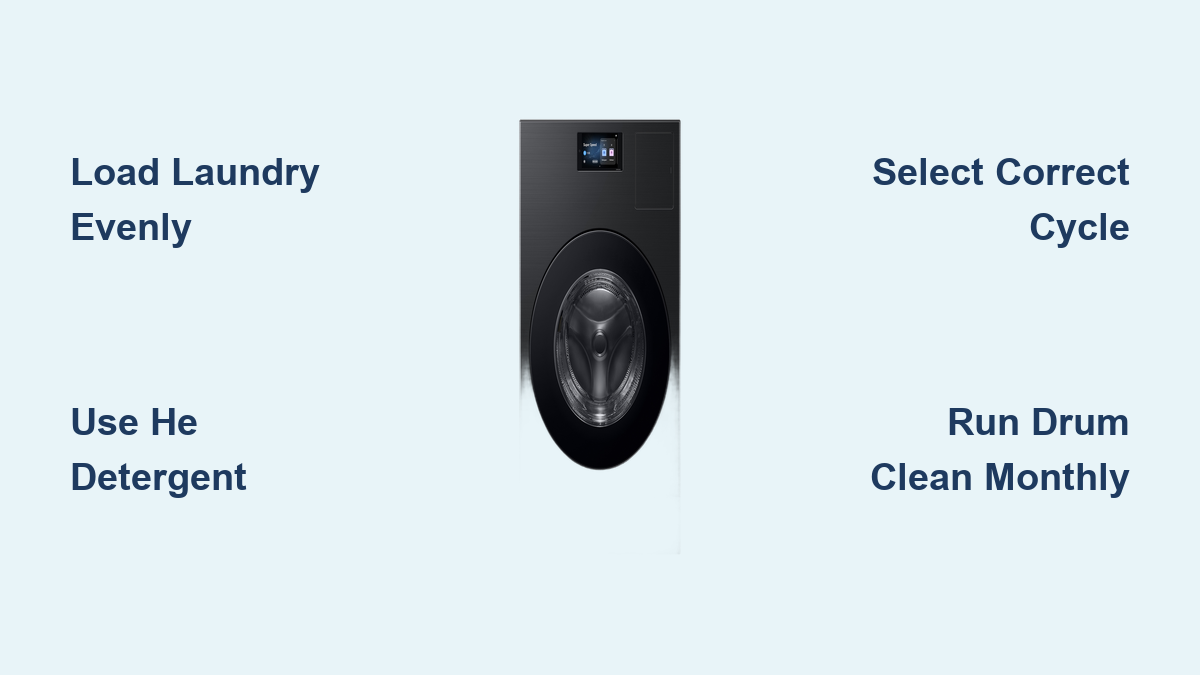
Open the lid or door and place clothes inside. For front-load models, distribute items evenly around the drum. Avoid stuffing. Leave space below the MAX fill line so clothes can tumble freely. For top-load models, place garments along the drum walls and keep the center clear, especially around sensors. Never block the door seal or detergent drawer.
Mix large and small items for balanced loads. Washing a single towel or pair of jeans alone may cause imbalance and loud spinning.
Select the Right Wash Cycle
Match Cycle to Fabric Type
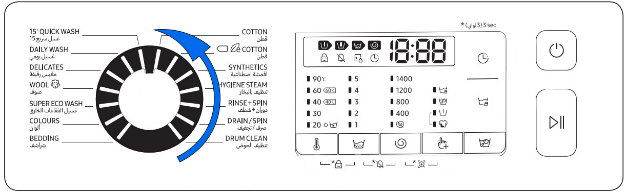
Samsung offers pre-programmed cycles tailored to fabric, soil level, and time. Choose wisely for best results:
- Cotton: Towels, sheets, underwear
- Synthetics: Polyester, sportswear, outerwear
- Delicates: Bras, lingerie, silk
- Wool: Machine-washable wool sweaters
- Hygiene Steam: Baby clothes, bedding, allergy sufferers
- Quick Wash: Small, lightly soiled loads under 2 kg
- Bedding: Duvet covers, blankets, maximum 2 kg
- Pet Care: Clothes with pet hair on select models
Use Eco and Speed Options
Super Eco Wash saves energy with low-temperature cleaning using Ecobubble technology. Super Speed Wash completes a full cycle in as little as 28 minutes, ideal for urgent laundry. Delay End lets you schedule finish time, for example 7 AM, to avoid peak electricity rates.
Changing temperature on Quick Wash may extend cycle time. Keep this in mind when selecting options.
Add Detergent Correctly
Use HE Detergent Only
Never use regular detergent. Samsung washers are high-efficiency and require low-sudsing formulas. Using the wrong type causes overflowing suds, poor rinsing, internal residue buildup, and error codes like SUD.
Acceptable forms include liquid HE detergent, HE powder, and HE pods or sheets, but only if compatible. Avoid organic detergents with vinegar, baking soda, or enzymes, as they can damage seals and sensors.
Place Detergent in the Right Spot
For front-load washers, pull out the detergent drawer and add liquid or powder to the left main wash compartment. Place pods or sheets directly in the drum, not the drawer.
For top-load washers, open the lid, pull out the drawer, add liquid to the cup, and place powder under the cup. Pods go in the drum before clothes.
For FlexWash upper washers, use the Aqua Pebble, fill with detergent not above the MAX line, and place under clothes in the tub. Do not use pods in the upper washer.
Auto Dispense models let you refill reservoirs with HE detergent and softener. The machine dispenses the right amount for up to 12 loads.
Customize Wash Settings
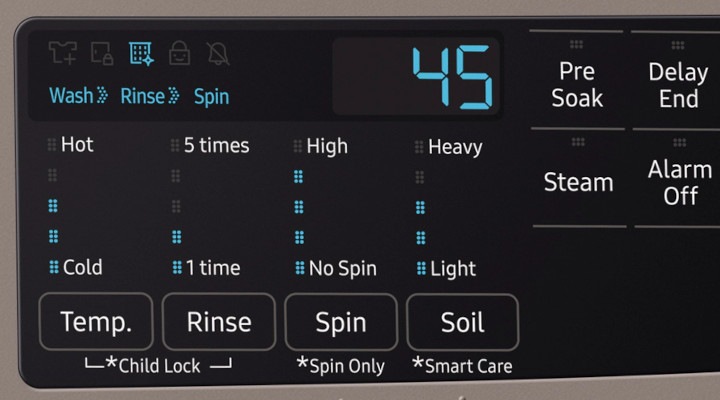
Adjust Temperature
Press the Temp button to change water heat. Cold settings between 15 and 20 degrees Celsius save energy and prevent color fading. Warm at 40 degrees Celsius offers balanced cleaning. Hot between 60 and 90 degrees Celsius sanitizes, ideal for towels, underwear, and bedding.
Use 60 degrees Celsius or higher with Hygiene Steam for allergen removal.
Set Spin Speed
Spin speed affects dryness and drying time. Most models offer up to 1400 RPM. Use lower spin for delicates like silk and wool. Disable spin by pressing the Spin button until the icon darkens.
Use Soil Level and Water Options
On top-load models, choose Normal or Heavy soil level for dirtier loads. Manually set water level or let Smart Load Assessment auto-adjust. Deep Wash adds soak time for tough stains.
Smart Load Assessment makes the machine spin briefly at start to detect load size and balance.
Use Smart Features and App Control
Connect to SmartThings App
Download the Samsung SmartThings app. Turn on your washer and follow in-app pairing instructions. Once linked, you can start or pause remotely, monitor cycle progress like seeing 41 minutes left, receive maintenance alerts, and scan error codes with Smart Care.
This feature works with 5.4 Cu. Ft., 5.5 Cu. Ft., 7500 series, and other supported models.
Enable Delay End and Mute Sound
Press the Delay button and set finish time at 3, 6, or 9 hours ahead. For muting sound, long-press the control panel for 3 seconds to disable the end-of-cycle chime on select models.
Pause or Change a Cycle
Pause Mid-Wash
Press Start/Pause. The machine stops, but the door remains locked until water drains and temperature drops as a safety feature. Wait up to 2 minutes before opening.
Change the Cycle
Press Start/Pause first. Turn the Cycle Selector or tap a new program. Adjust temperature, spin, or options as needed. Press Start/Pause again to begin the new cycle.
You cannot add clothes after the cycle starts on most Samsung models.
Activate Child Lock
Lock Controls to Prevent Accidents
On models with lock symbols, long-press the two lock buttons usually near Temp and Spin. A beep sounds and a lock icon appears. To unlock, press the same buttons again.
This feature is useful for homes with children as it prevents accidental cycle changes.
Clean and Maintain Your Washer
Run Drum Clean Regularly
Use Drum Clean, Eco Tub Clean, or Self Clean every 20 to 40 cycles. Run with an empty drum and use no detergent or bleach. Optionally add vinegar or commercial cleaner to remove odor.
Run a Boil Wash at 90 degrees Celsius under the Cotton cycle monthly to deep-clean the drum.
Clean Detergent Drawer and Filter
For the detergent drawer, press the rear tab and slide it out. Rinse all compartments under warm water. Use a soft brush to remove residue. Slide back in until it clicks.
For the drain filter on front-load models, locate it at the bottom front. Place a towel to catch water. Turn the filter counterclockwise to open. Remove lint, coins, or debris. Reinstall securely.
Clean every few months to prevent ND or No Drain errors.
Wipe Door Seal and Leave Door Open
Wipe the rubber gasket weekly to prevent mold. Leave the door slightly open after use to dry the drum and avoid musty smells.
Troubleshoot Common Issues
Detergent Residue on Clothes
Causes include too much detergent, wrong type like non-HE, or a clogged detergent drawer. Fix by using only 20 ml or 20 g in Quick Wash, cleaning the drawer monthly, and switching to a better-dissolving HE brand.
Unbalanced Load or Loud Noise
Causes include overloading, a single heavy item like jeans, or improper distribution. Fix by redistributing clothes evenly, washing bulky items in pairs like two towels, and avoiding overfilling past the MAX line.
Machine Will Not Start
Check that the door or lid is fully closed, the power cord is plugged in, water valves are open, and Child Lock is off. If still not starting, reset the machine by unplugging for 1 minute.
Musty Smell
Causes include wet clothes left inside, mold in the door seal, or infrequent cleaning. Fix by running the Drum Clean cycle, wiping the seal weekly, and leaving the door open after use.
Understand Error Codes
- UE means unbalanced load. Redistribute laundry.
- 4C means no water supply. Check hoses and valves.
- 5C or ND means drain issue. Clean filter and hose.
- SUD means too many suds. Use less HE detergent.
- SE means sensor error. Reset machine and call support if persists.
- Eco Tub Clean Reminder means it is time to clean the drum.
Use Smart Care in the SmartThings app to scan QR codes for instant fixes.
Model-Specific Tips

Samsung WA47CG3500AW Top-Load
Use the Hand-Wash Drawer for delicates. Press the button and the machine drains automatically. The transparent lid lets you monitor wash progress. Smart Load Assessment adjusts water and time.
Samsung WW10N645RBW Front-Load 10 kg
Boil Wash under Cotton cycle reaches 90 degrees Celsius. Use it monthly for hygiene. The 3-second button press unlocks advanced settings.
Samsung 7500 5.5 Cu. Ft. Top-Load
Auto Dispense holds detergent for 12 loads. Refill as needed. Super Speed Wash finishes in 28 minutes. The 20-year motor warranty ensures long-term reliability.
Samsung 5.4 Cu. Ft. Brushed Navy
Pet Care Cycle removes 6x more pet hair. Dual Pet Hair Filters capture fur effectively. Active WaterJet pre-treats stains with a built-in faucet.
Final Thoughts on Using Your Samsung Washing Machine
Using your Samsung washing machine correctly means cleaner clothes, fewer repairs, and lower energy bills. Stick to HE detergent, load evenly, run Drum Clean monthly, and use SmartThings for real-time control. Whether you are washing baby clothes, gym gear, or comforters, the right cycle and settings make all the difference.
Understanding your specific model features, like Auto Dispense on the 7500 or Pet Care on the Brushed Navy, helps you get the most from your machine. Regular maintenance prevents musty smells and costly error codes.
Follow this guide, and you will master your Samsung washer in no time. Start with proper loading, choose the correct cycle, and keep up with simple cleaning routines for years of reliable performance.
Frequently Asked Questions About Samsung Washing Machines
How do I know which wash cycle to use?
Match the cycle to your fabric type and soil level. Use Cotton for towels and sheets, Synthetics for polyester and sportswear, Delicates for lingerie and silk, and Hygiene Steam for baby clothes and bedding. Quick Wash works for lightly soiled loads under 2 kg.
Can I add clothes after the cycle starts?
No. Most Samsung models do not allow adding clothes after the cycle begins. This is a safety feature to prevent imbalance and ensure proper cleaning. Plan ahead and load all items before pressing Start.
Why does my Samsung washer show error code SUD?
The SUD error means excessive suds. This happens when you use too much detergent or the wrong type. Always use HE detergent and follow recommended amounts. Run a rinse cycle to clear the suds, then restart with less detergent.
How often should I run Drum Clean?
Run Drum Clean, Eco Tub Clean, or Self Clean every 20 to 40 cycles, or about once a month. Use an empty drum with no detergent or bleach. This prevents mold, odor, and residue buildup.
Is it normal for the washer to vibrate loudly?
Some vibration is normal, especially on spin cycles. However, loud noise often indicates an unbalanced load. Redistribute clothes evenly, wash bulky items in pairs, and ensure the machine is level. If noise persists, check for items in the drain filter.
Does SmartThings work with all Samsung washers?
SmartThings connectivity is available on specific models, including 5.4 Cu. Ft., 5.5 Cu. Ft., 5.1 Cu. Ft., and 7500 series washers. Check your model specifications or the Samsung website to confirm compatibility.